
Thumbframe · Updated 24 October 2026
Share thumbnail options with a client, editor or team
If you make thumbnails for someone else, or just want a second opinion, a folder of full-size files invites the wrong kind of feedback. Thumbframe's export puts the options on one image, in the layouts viewers see, with the actual small size next to them.
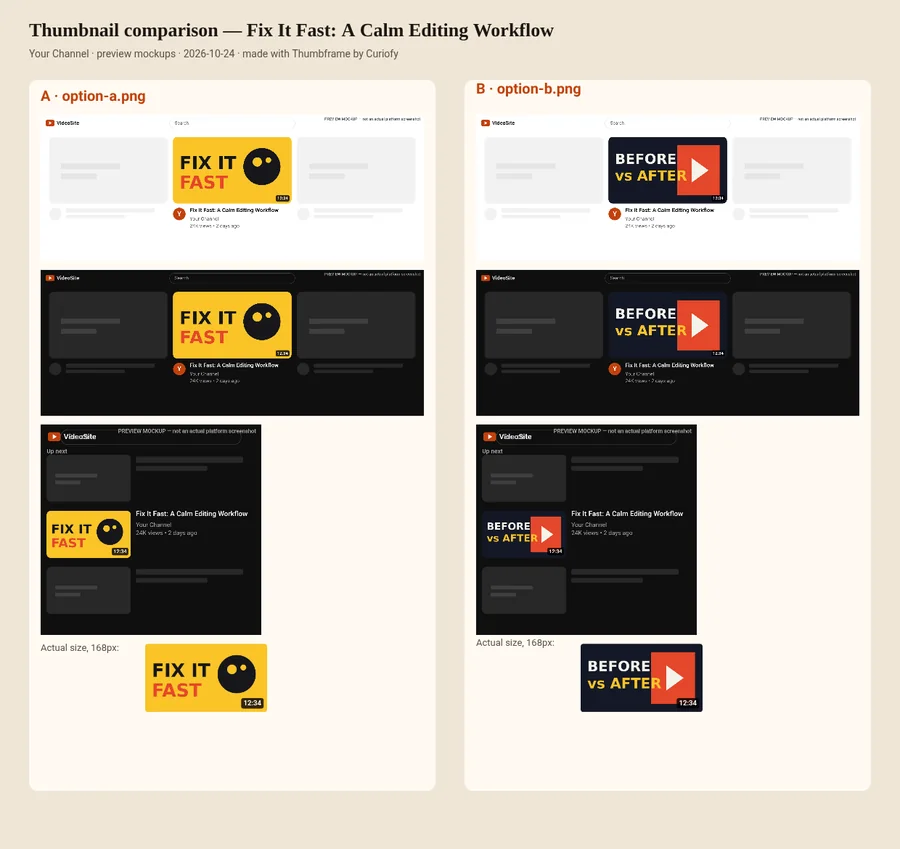
What the exported board contains
- A heading with the video title, the channel name and the date.
- For each thumbnail: a light home-grid mockup, a dark home-grid mockup, a dark "up next" mockup and the thumbnail at 168 px.
- Options lettered A, B, C and D with file names, so feedback can refer to them.
- A line saying they are preview mockups and the board was made with Thumbframe.
It is built in your browser and downloaded as a PNG. You send it by whichever channel you like; nothing is uploaded to Curiofy.
Why a board beats loose files
Someone opening a 1280 × 720 file on a large monitor judges detail that most viewers will never see. A board shows the same option next to the duration badge, in dark mode and at small size, which is closer to how a viewer meets it.
Ask for feedback that you can use
- Pick the decision. "Which of A, B or C should we test?" works better than "thoughts?".
- Ask for first impressions. "Which one did you notice first and what do you think it is about?"
- Limit the options. Two to four. More than that and people pick on taste.
- Separate taste from legibility. Legibility can be checked in the tool; taste is the client's call.
- Agree what happens next. If you will run a real test, say so; see A/B testing without TubeBuddy.
Free and Pro exports
The free tier exports the board with a Thumbframe Free watermark across it and with one thumbnail. Pro removes the watermark and lets you put up to four options on a board, which is the version you would send to a client.
Frequently asked questions
What does the exported comparison image include?
For each thumbnail it shows a light home-grid mockup, a dark home-grid mockup, a dark up-next mockup and the thumbnail at 168 px, under a heading with the video title, channel name and date.
Is the export watermarked?
On the free tier, yes. Pro exports are clean and can include up to four options.
Are the thumbnails uploaded when I export?
No. The comparison image is built in your browser and downloaded to your device.
Can I put my own branding on the board?
Not at the moment. The board has the video title, channel name and a line saying it was made with Thumbframe.
Related
- Compare two YouTube thumbnails side by side
- Test your YouTube thumbnail in dark mode and light mode
- YouTube thumbnail preview tool for desktop, mobile and dark mode
- How to preview a YouTube thumbnail before you publish
- YouTube thumbnail size and safe areas (2026)
- Thumbframe: the tool and pricing
- More tools for creators