
Thumbframe · Updated 24 October 2026
How to A/B test YouTube thumbnails without TubeBuddy
You do not need TubeBuddy to A/B test a YouTube thumbnail. YouTube Studio has a built-in test for eligible channels, and a careful manual swap works when it does not. Thumbframe does not run live tests and cannot tell you which thumbnail gets more clicks, but it helps you pick the candidates worth testing.
Three ways to test a thumbnail on real viewers
| Method | What decides the winner | What you need | Watch out for |
|---|---|---|---|
| YouTube Studio "A/B testing" | Watch time share, per YouTube Help | Studio on a computer, advanced features enabled, a public long-form video | Up to 3 variants. Not available for Shorts, kids, private or mature-audience videos. Results take a few days to 2 weeks and may be "Performed same" or "Inconclusive". |
| TubeBuddy thumbnail A/B test | Click-through rate, per TubeBuddy's notes | A TubeBuddy plan. On 24 October 2026 its site lists thumbnail A/B testing under the Legend plan. | It switches versions every 24 hours rather than showing them at the same time, which TubeBuddy says is a limit of YouTube's daily analytics data. |
| Manual swap | Whatever metric you pick from YouTube Analytics | Nothing extra | Day of the week and the video's age change who sees it, so the two periods are not equal. There is also a daily custom-thumbnail upload limit. |
These tools measure different things, so they can disagree. YouTube Help says its own test runs all variations at the same time and picks by watch time share, and that many third-party tools run tests one after another and often optimise for click-through rate. Neither is wrong; decide which metric you care about before you start. This page is not affiliated with TubeBuddy.
Where Thumbframe fits: before the test
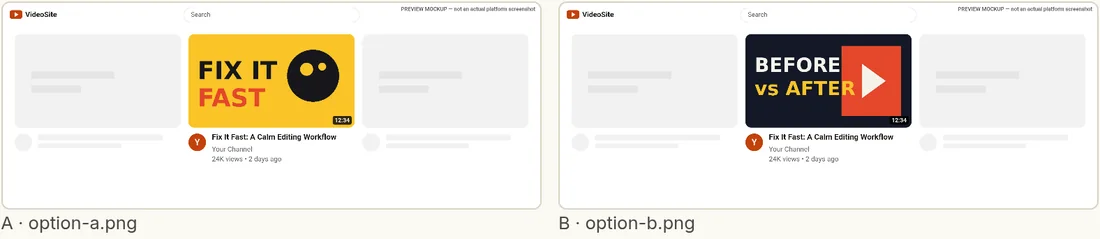
A live test is slow and uses real impressions, so go into it with good candidates. YouTube Help also says variants that are too similar take longer to produce a result. Thumbframe covers that earlier step:
- Put the candidates next to each other in the same feed layout and check they are different enough to be worth testing.
- Check each one at small size and in dark mode, so you are not testing a version that has an avoidable legibility problem.
- Cut the weakest. YouTube's test takes up to three variants and Thumbframe Pro compares up to four, so you can drop one before you start.
A cleaner test, using what YouTube Help recommends
- Make the variants clearly different. Similar variants may take longer to give a result.
- Upload at least 1280 × 720. If any thumbnail is below 720p, YouTube downscales all test thumbnails to 480p.
- Upload the one you would be happy to keep first. If the result is inconclusive, the first upload becomes the default.
- Do not edit the title or thumbnail mid-test. A change stops the test.
- Consider testing older videos first. YouTube suggests this to limit any effect on overall views.
If a test shows "Performed same", that is useful too: it tells you the difference did not matter enough to measure.
Frequently asked questions
Can I A/B test YouTube thumbnails for free?
YouTube Studio has built-in A/B testing for titles and thumbnails. YouTube Help describes the eligibility requirements (Studio on a computer, advanced features enabled, public long-form videos) and does not list a fee for it.
Why is the A/B testing option missing in YouTube Studio?
According to YouTube Help it is desktop only, needs advanced features, and cannot be used on Shorts, scheduled live streams, premieres that have not ended, private videos, made-for-kids videos or mature-audience videos.
Does Thumbframe run A/B tests?
No. Thumbframe previews and compares thumbnails visually and runs legibility checks. It does not show them to viewers or measure clicks. Use it to choose which candidates to test.
How many thumbnails can I compare in Thumbframe?
The free tier shows one thumbnail at a time. Pro compares up to four side by side.